
Health Experience Vision for CVS Patients
Overview
-
Facilitated vision workshops to redesign our Health Landing page from a "Minimum Viable Product" (MVP) to a "Minimum Lovable Product" (MLP)
-
The new vision empowers all patients (each with their own unique health scenarios) to manage and monitor their health — with help from CVS through personalized daily actions and reminders
Skills
Workshop Facilitation, UX Design Strategy, User Research, Negotiation with Product, Establishing Design Vision, UI Design in Figma
Time Frame
3 weeks (August 2024)
Role
Senior Experience Design Manager — I collaborated with Cora Books (Senior Design Lead) to plan and facilitate vision workshops for the design team, as well as designing directly in Figma with the team
Outcome
-
The vision workshops I facilitated enabled my team to push beyond the status quo and establish a vision based on user needs and innovative capabilities
-
Our vision covered a wide variety of patient needs and scenarios based on research and personas (different ages, genders, health scenarios, caregiver relationships, power users vs. guest users, adults vs. minors, etc.)
-
CVS's CTO, Tilak Mandadi, approved the vision — with his hypothesis that this product will be increase daily engagement
-
Informed our Product roadmap for the next 6 months of design and engineering work
-
Patients will be able to manage and monitor their health — with personalized daily actions and reminders from CVS

Problem
Current health landing page acts as a "quick links" page

While the existing Health Landing page meets "MVP" requirements by allowing patients to navigate to health resources, it has some issues:
-
Not personalized — everyone has the same landing page regardless of health needs
-
Puts the workload on the patient — to find what they need to take action on
-
If a patient hasn't had vaccines, previous visits, or lab results — this page isn't very helpful
-
Buried in the "Menu/More" app navigation tab — difficult to find
-
Not clear how to schedule a health visit
Our goal was to make this page more personalized, actionable, informational, and increase daily engagement with patients.
This vision had a 3-week deadline as a review was scheduled with our CTO, Tilak Mandadi, and we wanted the chance to get approval for a major redesign based on patient needs.
Design vision process
Why did we need to establish a design vision?
Our current Health Landing page had met MVP requirements, but had no further direction on how to evolve.
A design vision serves as an inspirational story for the best experience possible:
-
Establishes design point-of-view of how we can best serve our users
-
Drives product roadmap
-
Considers the holistic picture
-
Helps us move from a "viable" or "functional" product to a "lovable" product

"MVP" or "Minimum Viable Product" means meeting basic functionality requirements to get a product out the door quickly.
"MLP" or "Minimum Lovable Product" means pushing our experiences beyond "MVP" to become "Lovable":
-
Delight and empower users with a product they love
-
Innovate and push beyond the status quo
-
Differentiate ourselves from the competition and disrupt the industry

A new vision for our Health Landing page was needed to move us from an "MVP" product to an "MLP" product.
CVS has "Lovable Imperatives" that help guide Design, Product, and Engineering into thinking how we can create more lovable experiences.
I used these imperatives to inspire the design team on how a vision could help us create the most lovable experience for the Health Landing page.
How did we set a design vision?
Cora Books (our Senior Design Lead) and I planned milestones for creating a vision with our team:
-
Review persona and patient research
-
Brainstorm potential capabilities with Product that solve both user and business needs
-
Map capabilities to "Horizons" framework (near-term vs. future capabilities)
-
Apply capabilities to real-life patient scenarios — craft a clear story on how capabilities help patients (this may narrow down the list of capabilities)
-
Design a prototype that showcases capabilities

Planning and facilitating vision workshops
We planned several checkpoints and working sessions for the team:
-
Daily Stand-Up — Review current status of designs, blockers, and goals for the day
-
Monday — Heads-down time
-
Tuesday — Design collaboration session
-
Wednesday — Design feedback session (design-team only)
-
Thursday — Design collaboration session
-
Friday — Review with stakeholders (Product & Design leadership)
This plan allowed us to give the design team structure while under an intense deadline.
Establishing new capabilities based on research and the lovable imperatives
Personas
We collaborated with our researchers to review our Health patient personas as a team — each based on real-life and common patient scenarios:
-
Sophia — The "Chief Health Officer" of her family who prioritizes the health of all family members and is a CVS "super user"
-
Michael — The Complex Patient who has multiple chronic conditions, but puts off his own health to prioritize his family and work
-
Lucas — The Independent Zoomer who needs his parents to manage both his physical and mental health


Each persona has an extensive list of health needs and tasks they need to take (beyond the screenshots shown here) — we reviewed these as a team ahead of brainstorming capabilities.
Patient pain points for Sophia, Michael, and Lucas related to managing health:
-
I need to be reminded on the health actions to take for myself and my family, so that I can ensure I'm taking care of my family on time
-
I need to easily access my latest health records and labs information, so that I can see results and make quick decisions
-
I need to monitor my health and see changes over time, so that I can take action on any abnormal health changes
-
I need easy access to health resources and care plans, so that I can take care of myself and my family as issues arise
-
I need to be empowered with preventative care, so that I can prevent health issues for myself and my family
-
I need to know where my health stands among similar demographic groups, so that I can understand what average health ranges are
Lovable Imperatives
The Lovable Imperatives inspired us to reframe how we think about empowering the user with their Health Landing page, in conjunction with the research and user scenarios we gathered.
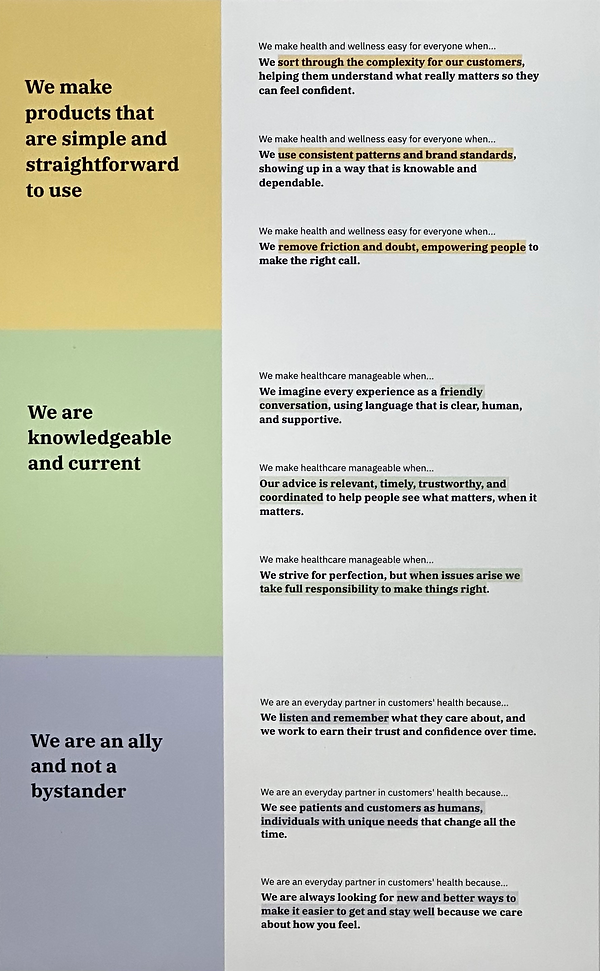
Collaborating with Product on potential capabilities
We took the research, user scenarios, and lovable imperatives — then met with Product team members to brainstorm any potential capabilities that could solve both user needs and business needs.

Horizon mapping
Our team used the Horizon mapping framework from McKinsey to map the growth and capabilities of our product.

Horizon mapping pushes teams to see that if they stick with small iterations and no innovations, then the value of the product doesn't grow over time.
We took our brainstormed list of potential capabilities and mapped them across Horizons 1, 2, 3 which made it easy to see what capabilities should be prioritized near-term vs. long-term (based on technical feasibility, business impact, user impact, etc.)
With this information for each capability, we were able to prioritize which capabilities to highlight and test in our vision:
-
User research & data — reported pain points, difficulty with tasks, or research directive
-
Horizon mapping — current, near-term, or long-term
-
Prioritization for vision — Low (low UXR impact and Horizon 1), Medium (medium UXR impact and Horizon 2), High (high UXR impact and Horizon 3)

Applying capabilities to real-life user scenarios
Based on our persona patient scenarios — we mapped what it would look like for Sophia, Michael, and Lucas to manage their health with the prioritized capabilities.
For example: Based on real-life common health scenarios, the research team created the persona of Michael. In his scenario, he suspects he might be diabetic, and after an A1C test he is diagnosed with diabetes by his provider. He is given a care plan by his provider with instructions to get quarterly A1C tests.
This helped us craft a clear story on how our new capabilities could help patients.

Designing a vision artifact together
Low-fidelity zones
Now that we had our list of capabilities and knew the patient stories we wanted to tell for our vision, we started creating wireframes for how these capabilities could appear on a patient's Health Landing page.
Cora and I led workshops for the team to collaborate and design together — creating the information architecture and eventual low-fi mocks.

We designed "dynamic zones" that maintained a specific information architecture for the page, while allowing the information within each zone to be personalized for each patient:
-
Quick actions — Easily schedule a visit, see care plans, message a provider, switch profile to a child's healthcare view, or search for records
-
Top 3 things — Health reminders, actions to take for family, health recommendations
-
Visits — Schedule a new visit or see recent visits
-
Health history — Visits, labs, prescriptions, vitals, health tracking/monitoring, comparison to other demographic groups
-
Awareness — Recommendations, preventative care, living care plan, promotions
-
Relevant articles — Health resources related to Michael and his family's health
-
Providers — Michael's providers and others to explore
High-fidelity prototype
We used the "dynamic zones" and created high-fidelity prototypes that showcase the new capabilities to help Michael, Sophia, and Lucas manage their unique health scenarios.
Again, Cora and I led workshops for the team — we assigned dynamic zones to each designer and recommended that they use our design system to quickly create the dynamic zones in high-fidelity.


CTO approval and next steps
Tilak Mandadi's approval
The Health Landing page vision was presented to the CTO by our Executive Design Director — the prototype was presented with notes on near-term vs. future capabilities based on the "Horizon" mapping.
Tilak loved the innovative capabilities that empower patients to manage their health and prevent future health issues. He even said he wanted to "present it at the Consumer Electronics Show!"
With his approval, we had the green light to execute on the vision.
Next steps: Planning to execute on the vision
-
Collaborate with Product to create features based on the vision's capabilities — and the "Horizon" mapping (near-term vs. long-term)
-
Designers and engineers will pair up to create and test the capabilities with patients
-
Weekly Design, Product, and Engineering reviews will allow us to stay consistent in the creation of each capability